
Ad attribution, ROAS and POAS
See which ad campaign brought each order, compare spend with net revenue and real profit, book ad spend, and report a cash-on-delivery sale only once paid.
What it is
Order attribution shows which ad or campaign brought each order. A small plugin on your WooCommerce store, CFI Order Attribution, records where each visitor came from: the ad click id, the UTM tags, the landing page and the referrer. It can also ask "How did you hear about us?" at checkout. When the order reaches the app, that record is stored with it.
Connected ad accounts (Google Ads, Meta Ads, TikTok Ads, Microsoft Advertising, LinkedIn Ads, Pinterest Ads and Snapchat Ads) bring in the daily spend per campaign every night. The report then puts orders, net revenue, profit and spend side by side per platform and campaign.
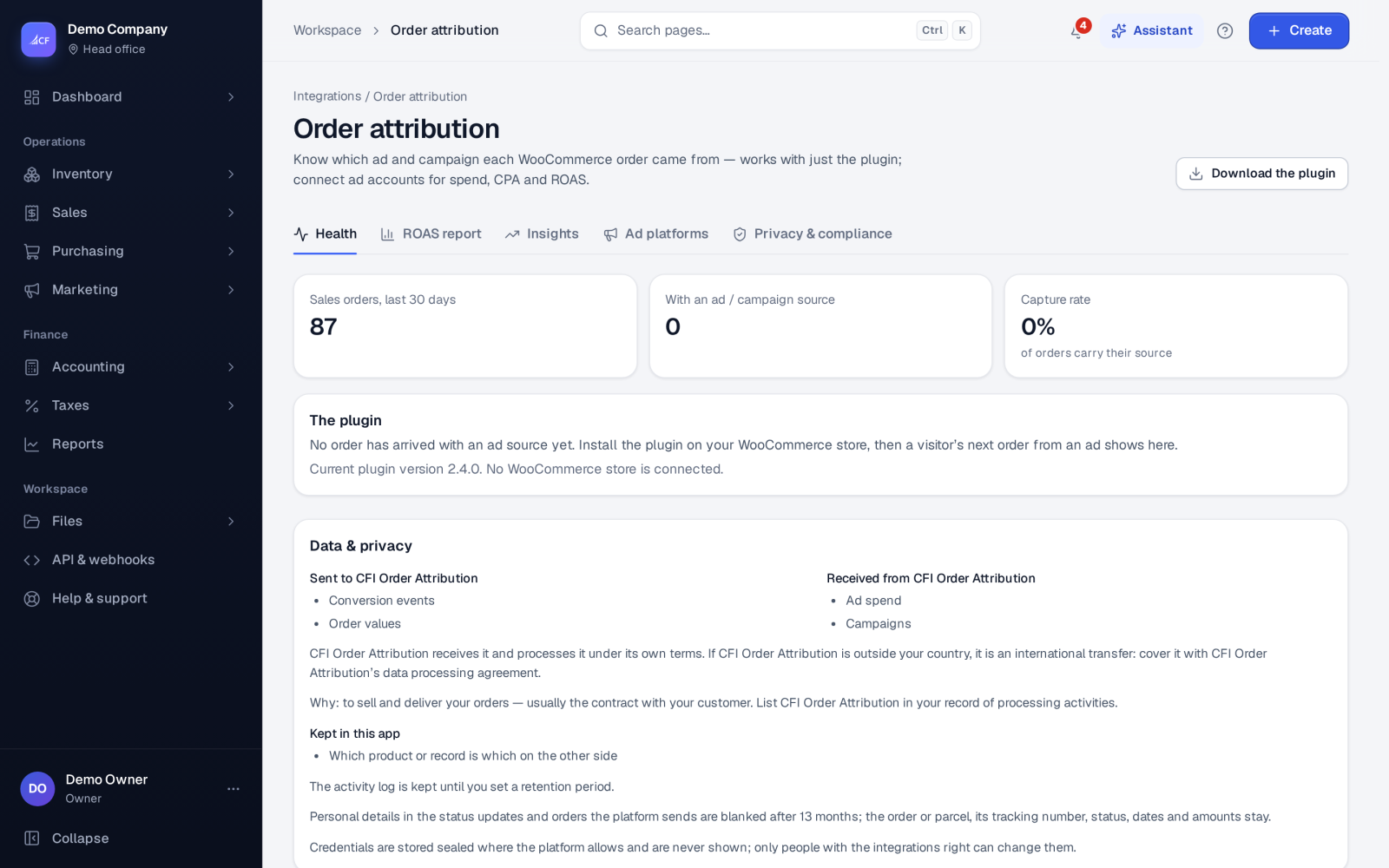
The screen has the tabs Health, ROAS report, Insights, Ad platforms and Privacy & compliance.
Who it is for
- Online sellers who advertise on Google, Meta, TikTok or other platforms
- Cash-on-delivery sellers who need to know which campaigns bring orders that are actually paid
- Owners who want profit per campaign, not just revenue
- Accountants who need ad spend accrued in the right month
Before you start#
- You need access to Integrations. Connecting an ad account needs the Integrations Edit right.
- Install the CFI Order Attribution plugin on your WooCommerce store, and use a consent banner.
- Margin and profit by campaign also need the Gross profit report right, and margins must not be hidden from you by field rights.
Step by step#
- Open Integrations › Attribution, go to Ad platforms and choose Connect on a platform card.
- Choose Sign in with the platform and allow read-only reporting access. Nothing is changed in your ad account.
- Copy the platform's line from UTM templates into your ads, so every click carries the campaign id.
- Check the Health tab after a few orders: the capture rate, captures by platform and the plugin version.
- Open the ROAS report, choose a period, a credit model and a lookback window.
- Choose Orders on a campaign row to see the orders behind it.
Credit models#
- First touch (default) and last touch
- Linear: every visit gets an equal share
- Position based: 40 % first, 40 % last, 20 % shared in between
- Time decay: newer visits weigh more
- Last non-direct click: the last visit from an ad, campaign or another site
- Data-driven: learned from your own orders; it needs at least 30 orders with visits from 2 or more channels, and uses linear until then
The lookback window is 7, 28 (default) or 90 days.
ROAS, POAS and profit#
- ROAS = net revenue ÷ ad spend.
- POAS = profit ÷ ad spend.
Net revenue excludes tax and shipping charged, less returns and refunds. The From revenue to profit card then takes off the cost of goods, the courier's real shipping charge, payment fees, and return shipping and refusals. A cash-on-delivery parcel that was refused brought no money: its revenue is 0, but its shipping and cost stay against the campaign. Spend is converted to your currency at your own exchange rates, and matched to orders by campaign id.
Cash on delivery: Purchase only when paid#
The app's server sends conversions to Meta, TikTok, Google Ads and Microsoft Advertising. Purchase is sent only when the order is really paid: for cash on delivery, when the courier's cash is settled or a person approves the COD review. Refused, returned, cancelled or fake orders are never sent as Purchase. Google gets a retraction for an order already uploaded. Only orders whose customer gave marketing consent are sent, with contact details hashed first.
Insights#
Insights shows MER, new-customer acquisition cost, lifetime value by cohort with payback, what each platform reports next to what the app counted, a media mix model and a geo-lift test planner. The last two are estimates, clearly marked.
Ads Growth Agent#
On the Ad platforms tab the assistant checks tracking health and proposes fixes and audiences, such as excluding customers who refused cash-on-delivery parcels. Every change on an ad account is a proposal a person approves. It never raises budgets or starts campaigns, and Stop all changes halts everything.
How it posts to the books#
Ad spend can be posted from Ad spend in the books in Accounting: one journal per ad account per month, Dr Advertising per campaign, Cr Accrued Expenses. Later restatements post as adjustments. When the platform's invoice arrives, match it as a bill; the accrual is reversed and any exchange difference goes to realised currency gains.
Limits and what is not there yet#
- Built and contract-tested, not yet proven on a real ad account. The whole order path, from the store plugin to the app, has been verified end to end in a WooCommerce sandbox.
- CFI Order Attribution is proven against the provider's sandbox.
- Marketplace commissions are not in the profit yet.
- The Privacy & compliance templates (DPIA outline, record of processing, privacy-policy paragraph, cookie list) are templates to review with your adviser, not legal advice.
Questions#
Why does Meta show more purchases than the app?
Each platform credits itself, counts views, uses its own windows and may model conversions. The Insights tab shows both numbers side by side and explains the gap; neither is wrong.
Are refused cash-on-delivery orders reported to the ad platforms?
Never as a Purchase. They are kept for an exclusion audience, so ads can stop targeting people who refuse parcels.
Does connecting an account let the app change my ads?
No. The sign-in asks for reading only. Managing audiences needs a second, separate sign-in, and every change is still a proposal a person approves.
How long is ad-click data kept?
As long as your business sets in Settings › Access policy › Keep ad-click data.