
Leads, quotations and jobs
Follow an enquiry from lead to quotation, job and invoice, with each step linked to the next so nothing is billed twice or lost on the way.
What it is
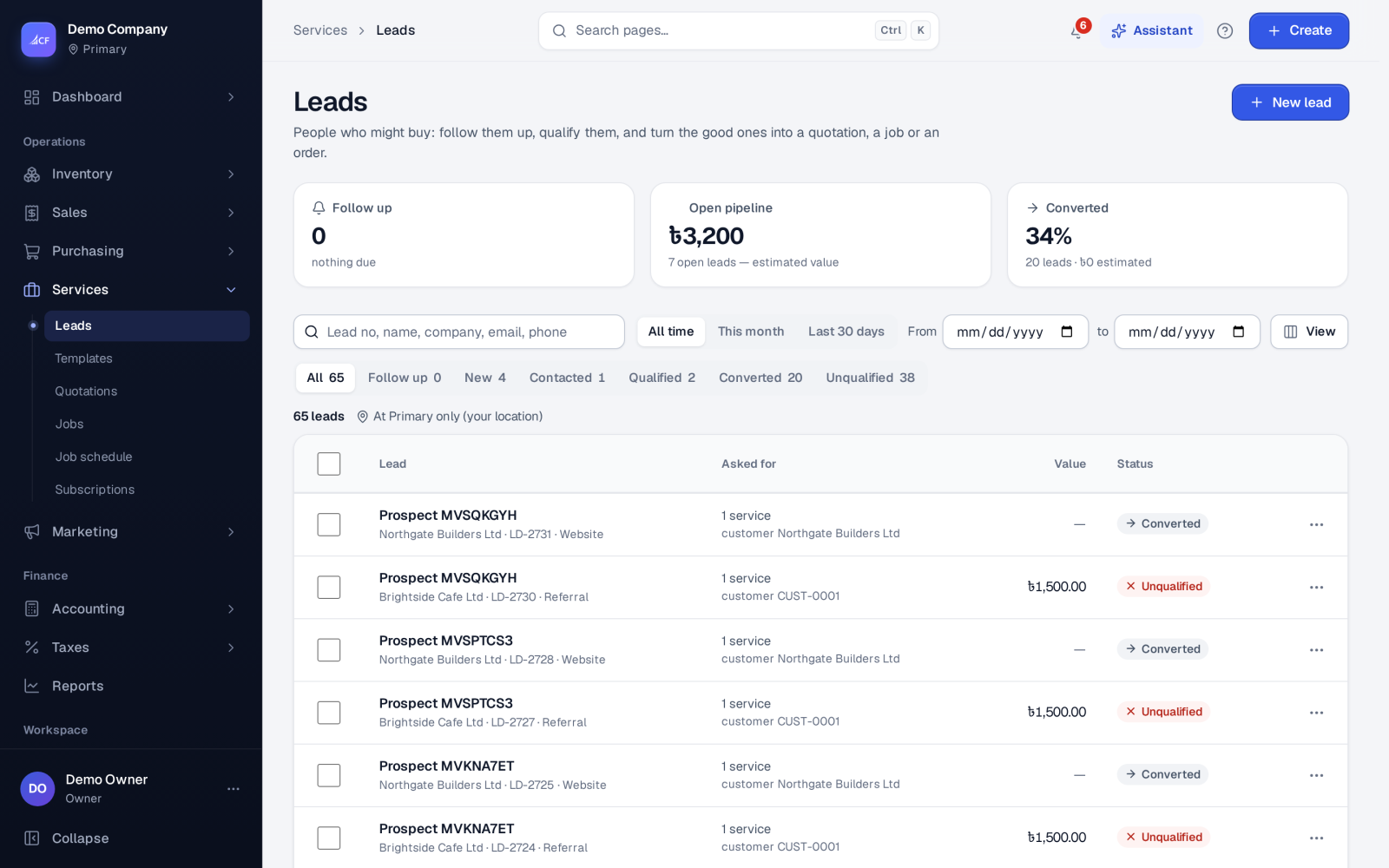
The services chain takes a customer enquiry all the way to an invoice. A lead records who asked, how they found you, what they asked for, its value and the next follow-up. When the lead is ready you convert it to a quotation, a job, or straight to a sales order or invoice.
Each document remembers where it came from, so the lead shows everything that was made from it. Each order or invoice line points back to its quotation or job line, so a line is never ordered or billed twice. Partial orders and invoices are allowed.
Who it is for
- Field service, repair and installation businesses that quote before they work
- Agencies and contractors who turn enquiries into priced offers
- Sales staff who follow up leads and need to see what became of them
- Makers who quote first and then start production from the accepted quotation
Before you start#
- Switch the stages on in Settings › Sales › Services. Services set-up turns the features on together, and Leads, Jobs and the others can then be changed one by one.
- Starting a job decides whether a job can start without an accepted quotation (walk-in work) or needs one.
- Converting needs the right to edit leads and to add quotations or jobs. Making a sales order needs the right to add sales orders.
Step by step#
- Open Services › Leads and choose New lead. Fill in the customer, the source, what they asked for and the value, then save.
- As you follow up, use the row's menu to Mark contacted, then Mark qualified.
- Choose Convert to quotation (or Convert to job, or Sales order or invoice). The customer is found or created from the lead, and the services asked for are copied across.
- Open the quotation in Services › Quotations, check the lines and prices, then choose Send… to e-mail or text it, or simply share its link.
- When the customer agrees, mark it Accepted.
- From the accepted quotation choose Make a job, Sales order or Invoice it directly.
- In Services › Jobs, Start the job, put it On hold if needed, and choose Finished when the work is done.
- Choose Invoice it (or Sales order) on the job. Only the lines not yet billed are offered.
Lead statuses#
A lead moves New → Contacted → Qualified → Converted. Mark unqualified… keeps your reason as a note, and Reopen brings an unqualified lead back to New. If a sales order made from a lead is deleted and nothing else came of the lead, the lead goes back to the status it had before. The Follow up view lists leads whose follow-up date has come.
Quotation statuses#
A quotation is Draft → Sent → Negotiating (edited after sending) → Accepted, or Rejected, Expired or Cancelled. Reopen… returns a rejected, expired or cancelled quotation to draft. The Past valid date view shows quotations nearing or past their valid-until date. An automation can mark sent quotations expired after that date.
With Online quotations switched on, the customer opens a signed link without signing in. They can add optional lines, accept by typing their name (and drawing a signature when you ask for one) or decline with a reason, and pay a deposit online. The acceptance is kept as evidence: who, when, from where, and exactly what was accepted. Accepting makes the sales order once nothing is left to pay.
Jobs and deposits#
A job has a name, a site address, a scheduled start, a duration, an arrival window, a team or technician and an assignee. It moves Draft → Started ⇄ On hold → Finished, or Cancelled. A cancelled job can be reopened as a draft.
With Job deposits set to Optional or Required, the job's Deposit… menu takes, applies, releases or voids deposits. Required stops a job from starting until its deposit is paid. A job can't be finished or cancelled while it still holds a deposit: apply it to the job's invoice, refund it, or move it to the customer's credit first.
From a quotation to production#
If production is switched on, an accepted quotation can start work orders. You get one work order per quoted item that has a bill of materials, for the quoted quantity. Items without a bill of materials are listed as skipped. The quotation itself is still ordered and invoiced as usual.
How it posts to the books#
Leads, quotations and jobs post nothing. A deposit taken on a job is money in against Unearned Revenue (Dr Undeposited Funds, or the customer's balance when drawn from it; Cr Unearned Revenue). Applying it to the job's approved invoice records a real payment receipt. The sale and what the customer owes post when the invoice is approved, like any other invoice.
Questions#
Can I invoice part of a job?
Yes. Invoice or order only some lines or quantities. The rest stays open on the job, and a line can never be billed for more than it holds.
What happens to the customer when I convert a lead?
The conversion uses the existing customer when it can find one, or creates the customer from the lead's details.
Can I see how many leads turn into work?
Yes. The Lead conversion report shows how many leads convert, by source and by owner. Quotation pipeline shows open quotations, the win rate and deal size.
Does the customer hear when a job changes?
Yes. When a job's status changes, or it is booked or moved, the customer gets an e-mail, or a text if there is no e-mail address. Each notice is recorded on the job's timeline.