
Subscriptions and recurring billing
Bill customers on a schedule: a plan makes an approved invoice each period, spreads income over the period if you choose, and pauses when unpaid.
What it is
A subscription is a recurring plan. It says what a customer is billed for, how often, and until when. Once it is active, the app makes the invoice for each period by itself and approves it, so the amount is in the books and owed. You don't have to remember to bill.
A plan can also spread each invoice's income over the period it covers, and pause itself when the customer stops paying.
Who it is for
- Maintenance, support and service agreements billed monthly, quarterly or yearly
- Rentals and memberships with a fixed charge each period
- Businesses that need deferred income for prepaid periods
- Accountants who want recurring revenue in the books without manual invoices
Before you start#
- Switch Subscriptions on in Settings › Sales › Services.
- Under New subscription defaults, set what a new plan starts with: how often it bills, how income is counted, the lead days, part periods and the grace days before an unpaid plan pauses.
- People need the add and edit rights on the Subscriptions page. Cancelling needs the delete right.
Step by step#
- Open Services › Subscriptions and choose New subscription, or start one from a service template or a job.
- Choose the Customer, give a Plan name, and set the Location and who it is Looked after by.
- Set Invoice every (a number of days, weeks, months or years), Starts on and, if it ends, Ends on.
- Add the lines under Each invoice bills, with Add an item or service, plus any Other costs you charge.
- Under Billing, choose the Payment term, Invoice days before each period, and whether A part period at the end isn't invoiced or is invoiced by the day.
- Under Count it as income, choose when invoiced, or Spread over the period it covers (deferred).
- Tick Make the invoices automatically, set Pause when unpaid after (days) if it differs from the default, and save.
How billing works#
- Periods are back to back from the start date: the first period starts on Starts on, and each next one starts the day after the last one ended. Billing is not tied to the 1st of the month.
- Each invoice is made Invoice days before each period ahead of the period it covers.
- Each run makes one approved invoice per due period, with the plan's lines, charged costs and their tax.
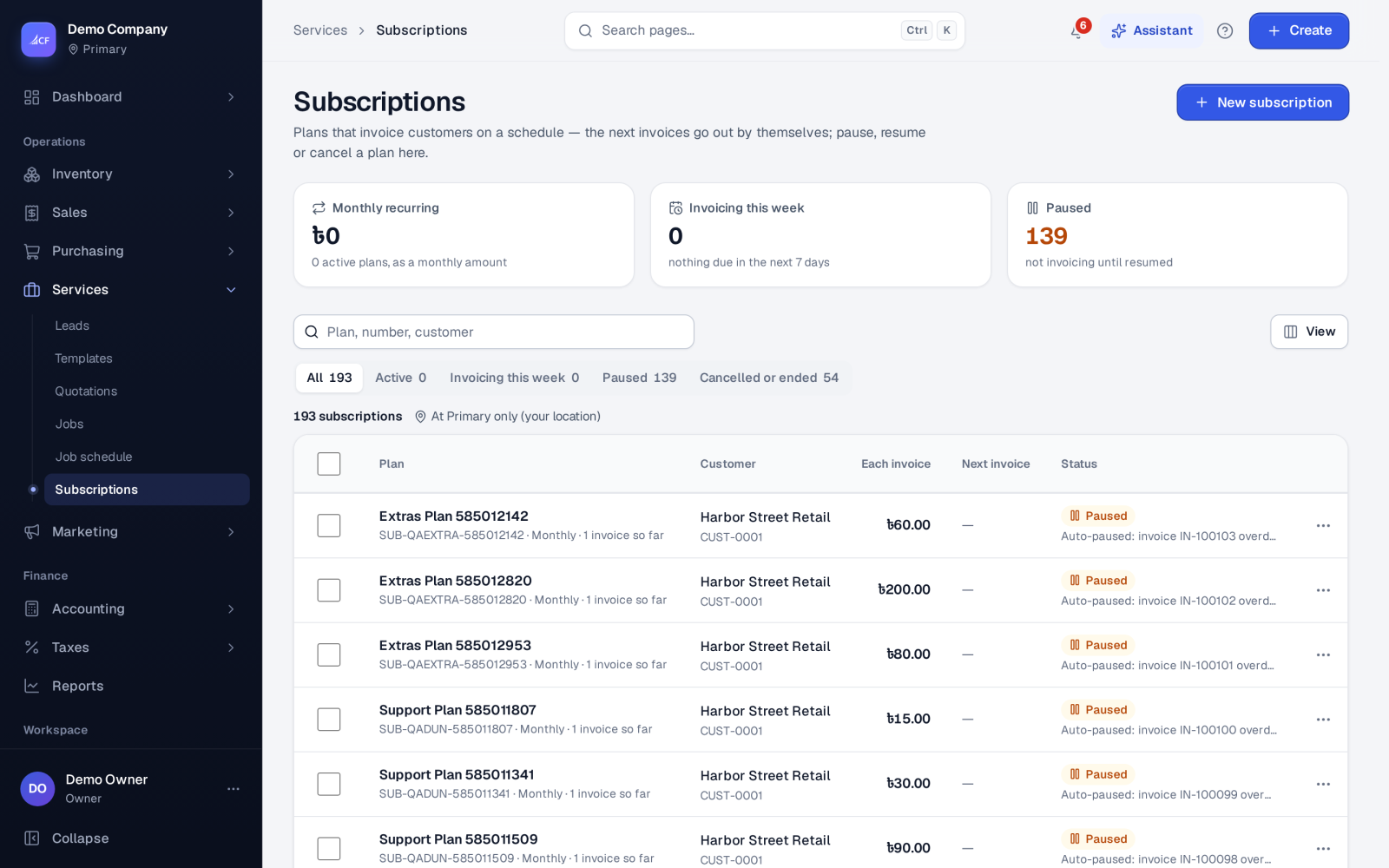
- The Invoicing this week view shows the plans about to bill. Invoices made on a plan lists what it has billed.
Statuses#
- Active — billing on schedule.
- Paused — no invoices are made. Pause keeps your reason; Resume clears it.
- Cancelled — automatic invoicing stops and your reason is kept. A cancelled plan can't be edited.
- Expired — the end date has passed.
If a plan's latest invoice is still unpaid after its grace days, the plan pauses by itself, records why, and e-mails the customer that payment is overdue. A payment or a manual pause made at the same moment wins.
How it posts to the books#
Each invoice posts like any approved sales invoice: the customer owes the total. With Spread over the period it covers (deferred), the income first goes to Deferred Revenue. As each part of the period ends, that slice moves to Subscription Revenue (Dr Deferred Revenue, Cr Subscription Revenue), once per slice. When income is counted as invoiced, it is income on the invoice date.
Limits and what is not there yet#
- The start date is fixed once the plan is made.
- How income is counted can't be changed after the plan has billed a period, so the books stay consistent.
- Each line carries one flat tax rate taken from your tax settings.
Questions#
Can the customer see their subscription?
Yes. Send gives the customer a link to the plan in the customer portal.
Where do I see recurring revenue?
The Subscription revenue report shows monthly recurring revenue and what was cancelled.
What happens to invoices already made when I pause a plan?
They stay as they are and are still owed. Pausing only stops new invoices. Resume when you are ready to bill again.
Can I bill every two weeks or every six months?
Yes. Invoice every takes a number and a unit, so "2 weeks" or "6 months" both work.