
Billing and plan
See your current plan, when it renews or ends, what the business uses against the plan's limits, and renew or upgrade monthly or yearly.
What it is
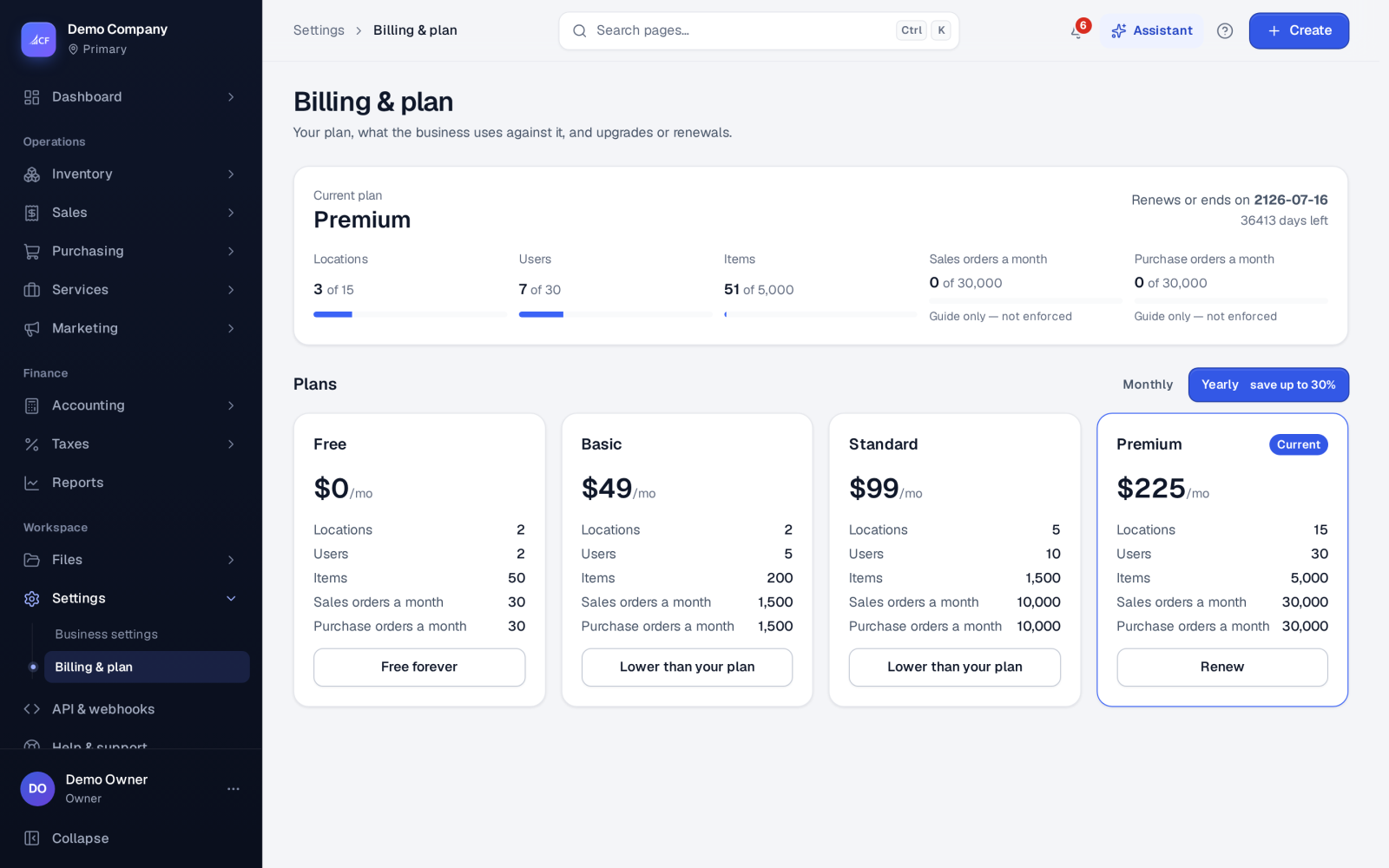
Billing & plan shows the business's subscription: the current plan, when it renews or ends, what the business uses against the plan's limits, and the plans you can move to. From here the owner renews the current plan or upgrades to a higher one.
The plans are Free, Basic, Standard and Premium. Free never expires.
Who it is for
- Business owners, who are the only people who can see billing and the plan.
- Growing businesses that are reaching a limit on locations, users or products.
Before you start#
- You must be the business owner. Anyone else is told that only the owner can see billing and the plan.
Step by step#
- Open Settings › Billing & plan.
- Under Your plan, check the plan, the Renews or ends on date and the days left.
- Compare what the business uses with the plan's limits.
- Under Plans, choose Monthly or Yearly (yearly saves up to 30%).
- Choose the billing period in months: 1, 6, 12, 24 or 36.
- Press Renew on your current plan or Upgrade on a higher one, then Continue to payment.
- Pay in the new tab with the payment provider. Your plan updates once the payment is confirmed.
Usage and limits#
The page lists what the business uses against the plan:
- Locations, users and products — these limits are enforced.
- Sales orders and purchase orders this month — shown as a guide only, marked Guide only — not enforced.
Monthly or yearly#
Monthly shows each plan's price for one month; Yearly shows the lower monthly rate of yearly billing, which saves up to 30%. The billing period (1, 6, 12, 24 or 36 months) is how many months you pay for at once. The page always shows the prices in force; nothing is charged until you finish the payment with the payment provider.
Your plan and the team#
Adding a location, a user or a product counts against the plan's limits as soon as it is saved. When the business reaches a limit, upgrading to a higher plan raises it. The assistant can tell the owner how close the business is to a limit; plan notes are shown to the owner only.
When a plan ends#
If a paid plan's end date passes without a renewal, the app shows Your subscription has ended with Renew plan. Nothing has been deleted. Until you renew, only Billing & plan and Help & support open, and API keys and connected apps are told the subscription has ended. Renewing brings everything back as it was.
Limits and what is not there yet#
- A plan lower than your current one cannot be bought from this page; it is shown as Lower than your plan.
- Prices are shown on the page itself and paid through the payment provider in a new tab.
Questions#
Will I lose data if my plan ends?
No. Nothing is deleted. You can still open Billing & plan and Help & support, and everything comes back when you renew.
Can I move to a smaller plan?
Not from this page — lower plans are shown as Lower than your plan and cannot be bought here. Your current plan can always be renewed.
Is the yearly price cheaper?
Yes. Yearly shows the monthly rate when paid yearly, saving up to 30%.
Why does my employee not see Billing & plan?
Only the business owner can see billing and the plan.