
Sales tax, VAT and GST
Set up the tax rates sales and purchases use, reclaim input tax, see what you owe per period, and file returns and country forms from the books.
What it is
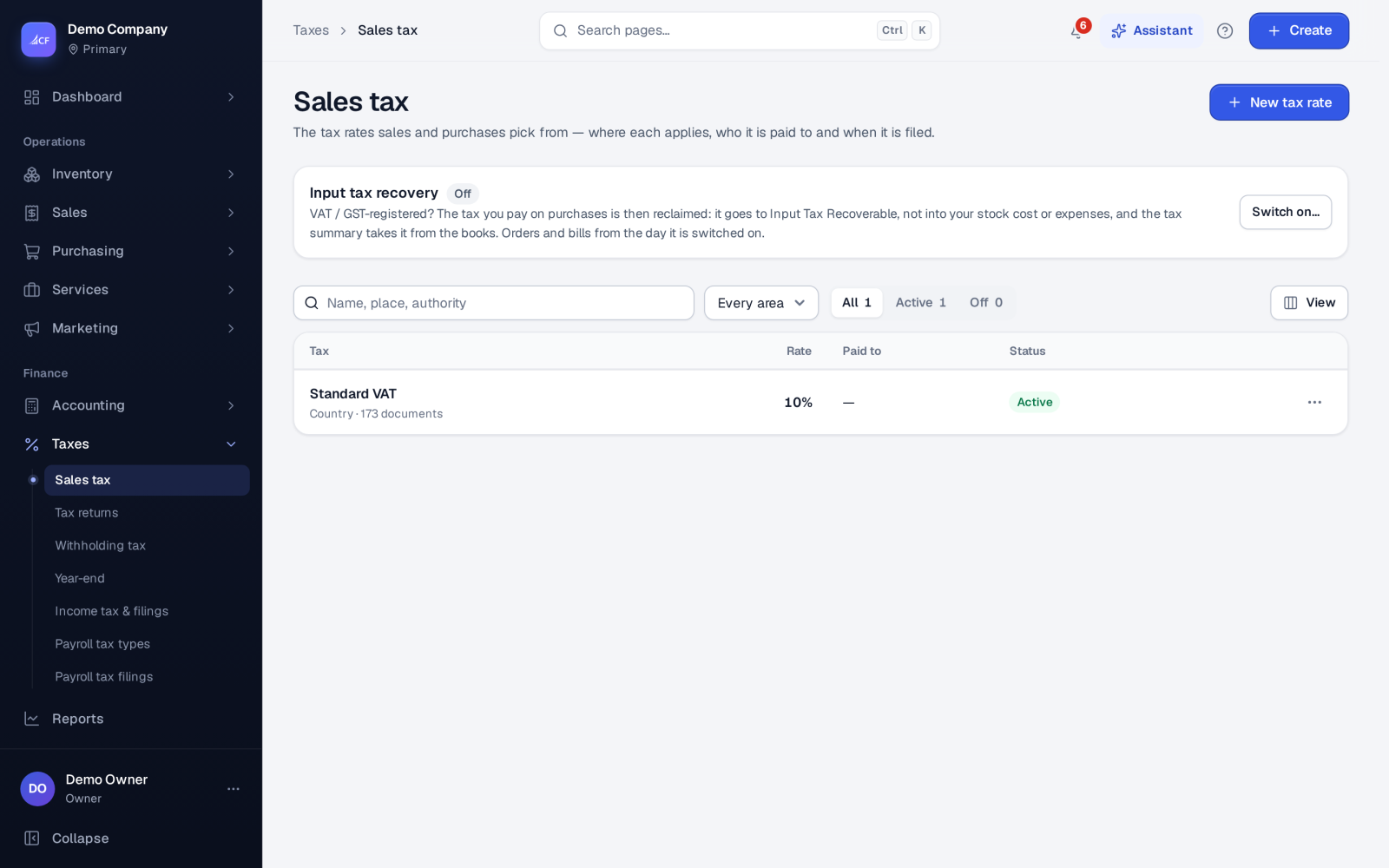
Sales tax, VAT and GST all work from one list of tax rates. Every sales and purchase document picks its taxes from that list. Each rate says where it applies, which tax authority it is paid to and how often it is filed. From the approved documents, the app works out what you owe for each period and shows it in Taxes › Tax returns. For some countries it also fills in the official return form box by box.
Withholding tax (tax withheld on payments) has its own screen under the same menu.
Who it is for
- Businesses registered for VAT, GST or sales tax in any country
- Accountants who file monthly or quarterly returns
- Businesses that reclaim the tax they pay on purchases
- Businesses that sell in several states or areas with different rates
Before you start#
- Switch tax on in Settings › Sales › Pricing and tax: Sales tax = Yes. Choose whether Prices exclude tax (tax added on top) or include it, and whether to work out Tax before discount.
- Fill your tax registration number in Settings › Business information. Country forms list a missing number as a problem that stops filing.
- The tax authority is a supplier. Add it in suppliers, or add it from the rate form.
- Rights: Sales tax (view, add, edit, delete) for rates; Tax returns view to see and export, add to file, edit to reopen or amend.
Step by step#
- Open Taxes › Sales tax and choose New tax rate.
- Give it a name and a rate, and pick its tax class (for example standard, reduced, zero rated or exempt).
- Say where it applies: a country, state, city or postcode, and whether it applies to that area only.
- Pick the authority it is paid to, and set the filing calendar: the fiscal period, the schedule and the return window.
- If you are VAT or GST registered, switch on Input tax recovery on the same screen, so tax on purchases is reclaimed.
- Use the rate on sales orders, invoices and bills as usual.
- At the end of a period, open Taxes › Tax returns, check the amount owed for the period, and choose File once the period has ended.
Tax rates#
A rate can also be:
- Compound: worked out on top of other taxes.
- On shipping: applied to delivery charges too.
- Given a priority, which sets the order when several taxes apply.
- Set to make an instant bill to the authority with each invoice.
Names are unique (ignoring capitals). A rate that documents already use cannot be deleted; switch it off instead.
A rate can carry a treatment, such as reverse charge, supplementary duty, import or exempt. The treatment tells the country forms which box a line goes in. When it is left empty, the treatment is worked out from the class, the name and the percentage.
Input tax recovery#
With input tax recovery on, the tax on purchases goes to Input Tax Recoverable, not into stock cost or expenses. The tax summary then takes it from the books. It applies to orders and bills from the day it is switched on.
Tax returns#
Taxes › Tax returns lists every period of the chosen fiscal year for each authority: running, due (return window open), overdue or filed. The tax owed is worked out live from approved and closed invoices, less credit notes, for the rates paid to that authority. Filing records the period, its amounts and the date. A period that has not ended cannot be filed. A person with the edit right can reopen a filing.
Country forms
The Country forms button opens your country's statutory forms, worked out box by box from the approved documents. Forms available today: the Bangladesh Mushak-9.1 VAT return with the Mushak-6.1 purchase book and 6.2 sales book, the UK VAT 100 (9 boxes), the Saudi VAT return, the UAE VAT201 (by emirate), and India GSTR-1 and GSTR-3B.
- Each box opens the documents behind it.
- Boxes the documents cannot know, such as penalties or corrections from earlier periods, are typed in with a reason.
- Problems are listed. Serious ones, such as a missing tax number or lines without an HSN code, stop filing.
- Export as CSV, JSON or the portal file, or print.
Filing freezes the form, and the period lock moves to the end of the period under your close rule. A correction is an amendment: a new version that names the one it replaces and why. Filed versions are never edited.
Withholding tax#
Taxes › Withholding tax keeps the withholding codes and the register of tax withheld on payments (exportable as CSV), the statutory withholding return where your country has one, certificates, and the tax your customers withheld from what they paid you, which is a credit to claim.
Reports#
Tax summary & return worksheet, Sales tax summary, Sales tax liability and Sales tax detail are in Reports.
How it posts to the books#
- Tax on approved invoices is posted to the sales tax account as owed. Credit notes reduce it.
- With input tax recovery on, tax on purchases is posted to Input Tax Recoverable.
- Paying withheld tax to the authority posts Dr Withholding Tax Payable, Cr the bank.
- Filing a sales tax return records it; it does not post a journal.
Limits and what is not there yet#
- Returns are not sent to a government portal from the tax returns screen. Export the portal file, or, in the United Kingdom, file the VAT 100 through Making Tax Digital with the UK VAT pack.
- Country forms exist for the countries listed above. Elsewhere, use the tax returns screen and the tax summary report.
- Filing a country form needs a database update the owner applies. Until then, forms are worked out and exported only.
Questions#
Can one invoice carry two taxes?
Yes. A document can carry several rates. Priority sets their order, and a compound rate is worked out on top of the others.
Why does a return still show as overdue?
Its period has ended and the return window has passed without a filing. Choose File once you have submitted it to the tax office.
How do I correct a filed country form?
Amend it. The amendment is a new version that names the version it replaces and the reason. The filed version stays as it was.