
Cash and bank management
Every cash, bank and wallet account with its balance; deposits and withdrawals, statement import with matching rules, and reconciliation with sign-off.
What it is
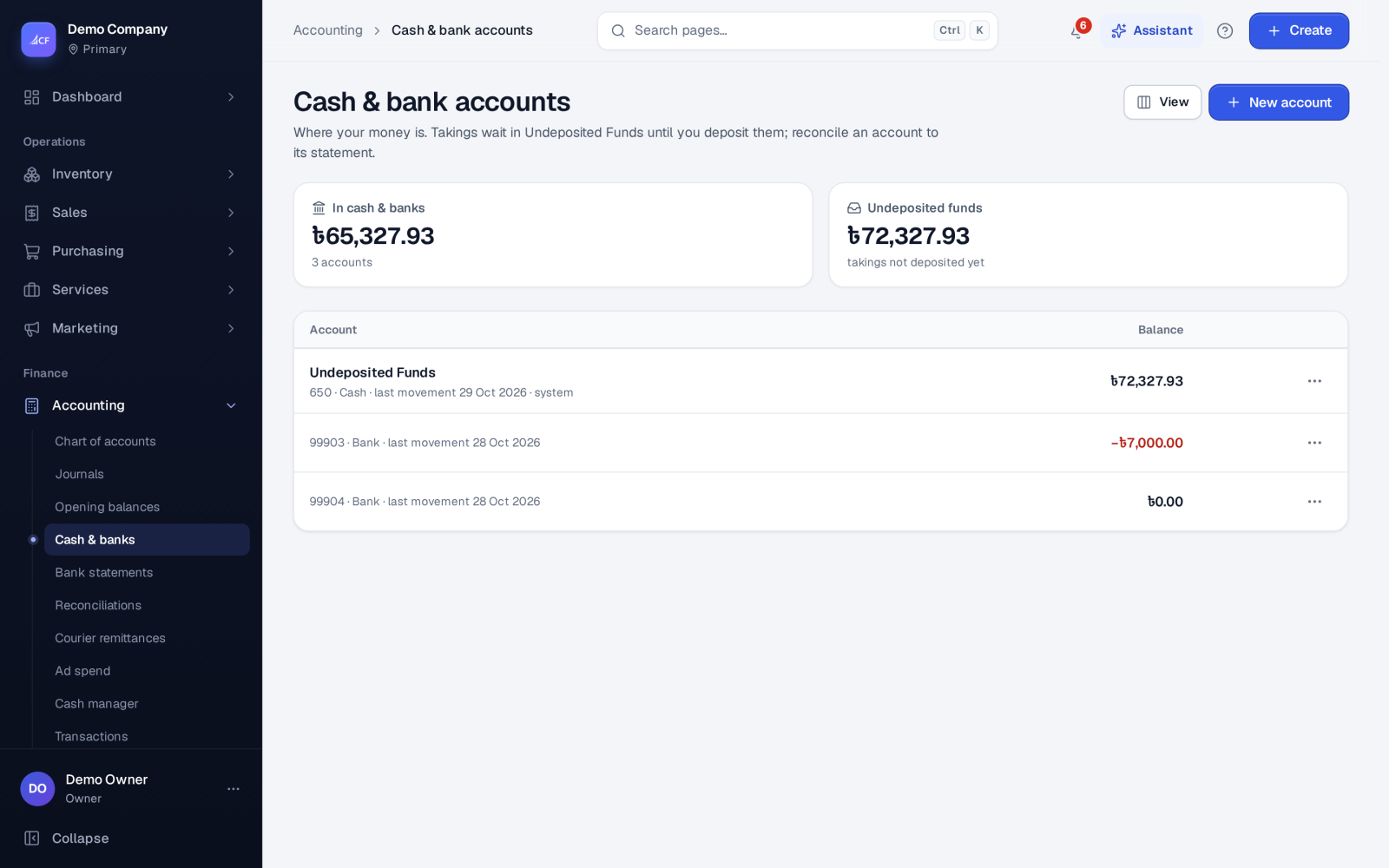
Cash & banks lists every cash, bank and wallet account with its balance, and what is waiting in Undeposited Funds. Customer payments usually land in Undeposited Funds first. A deposit then moves them into the bank account they really went into.
Bank statements imports your bank's statement file and matches each line to what is already in the books, or to the invoice or bill it pays. Reconciliations proves every balance-sheet account at a period end, with a preparer and a different reviewer.
Who it is for
- Bookkeepers who bank the day's takings and match the statement
- Owners who want to know the real cash in each account
- Accountants closing the month with signed-off reconciliations
- Shops whose tills feed cash into the books through the cash manager
Before you start#
- Cash and bank accounts are accounts in your chart of type Cash or Bank. Add one with New account on the Cash & banks page.
- Rights: view to see; add to deposit and withdraw; edit to reconcile, import statements and set rules. Matching to an invoice or bill also needs the right to record that payment.
Step by step#
- Open Accounting › Cash & banks. Each account shows its balance.
- From a row's menu choose Deposit… to move money from Undeposited Funds into the account, or Withdraw… to take it back out. Choose the date; the period lock applies.
- Open Accounting › Bank statements, choose the Account, and choose Import statement.
- Pick the file (CSV, OFX / QFX, CAMT.053 or MT940). For a CSV, confirm the columns once and save the layout for that bank.
- Check the preview: new lines against lines already imported, and the opening balance plus lines equal to the closing balance. Then import.
- In Reconcile, work through the open lines. Each line offers its likely matches, best first. Choose one, or post the line to an account, or ignore it. Auto-reconcile matches what is certain.
- Under Rules, save what you match again and again, for example bank fees posted to an account with tax.
How matching works#
On import, the app matches what is certain by itself:
- a movement already in the books for the same amount, on the same account, within 7 days, when it is the only one
- an invoice or bill named in the line's text, for exactly what is owed
- your rules marked "apply on import"
Each line is reconciled once, and each movement in the books confirms one line only. A line can be matched to a movement already in the books (nothing new is posted), to a payment for an invoice or bill, or to a journal to one or more accounts. Unmatch undoes it exactly: the payment is deleted or the journal reversed, and the line is open again.
Reconciliations and sign-off#
Accounting › Reconciliations shows every balance-sheet account at a period end. It sets the book balance against what proves it: the last imported statement for banks, open invoices and bills for receivables and payables, stock valuation for inventory, and a schedule you enter for the rest. Reconciling items explain the gap. What is left must be within your threshold to sign off. A preparer signs, a different person reviews, and a reviewed reconciliation is locked until the owner reopens it. The page flags one whose book balance moved afterwards, such as a back-dated posting. Evidence files are kept with each reconciliation.
How it posts to the books#
- Deposit: Dr the bank or cash account, Cr Undeposited Funds. Withdraw is the reverse.
- Reconcile… on Cash & banks records the statement balance. Any difference against the book balance goes to Suspense for you to investigate.
- A statement line matched to a payment or journal posts through that payment or journal, with its own numbering and the period lock.
Till cash#
Accounting › Cash manager handles the tills' cash: shifts opened with a float and closed with the cash counted against what was expected, the registers, and every cash movement in and out.
Questions#
Which bank files can I import?
CSV (with a column layout you confirm and can save per bank), OFX / QFX, CAMT.053 and MT940.
Will importing the same statement twice duplicate lines?
No. Lines already imported for that account are recognised and shown as such in the preview.
What if a line matches nothing?
Post it to an account, with tax or split across accounts, or ignore it. Or save a rule so the next one is handled for you.
Can the same person prepare and review a reconciliation?
No. The reviewer must be a different person: the owner, or someone with the approve right on the chart of accounts.