
Stores and marketplaces
Connect online stores and marketplaces so orders arrive as sales orders and every channel shows your available stock, with an honest proof level for each.
What it is
Cash Flow Inventory connects to online stores and marketplaces and runs them from one back office. Orders placed online arrive as sales orders with the customer, the shipping charge and the payment state. Your stock is the one truth: every stock change here — a sale at the till, a purchase receipt, an adjustment, a count, a transfer, production — is sent to every connected channel, so no channel sells what you no longer have.
Each connection has its own page with its connection, what it syncs, its orders, listings, webhooks, health and a privacy note (see Integration workspaces).
Who it is for
- Shops that sell in person and online from the same stock.
- Online sellers with more than one store or marketplace.
- Distributors whose customers order through a web shop.
Before you start#
- In Settings › General, set Where you sell to Online or In person and online; this turns the online-store integrations on.
- Connecting and changing integrations needs the integrations right.
- Keys and passwords are typed on the connection's own page — never into the assistant's chat.
Step by step#
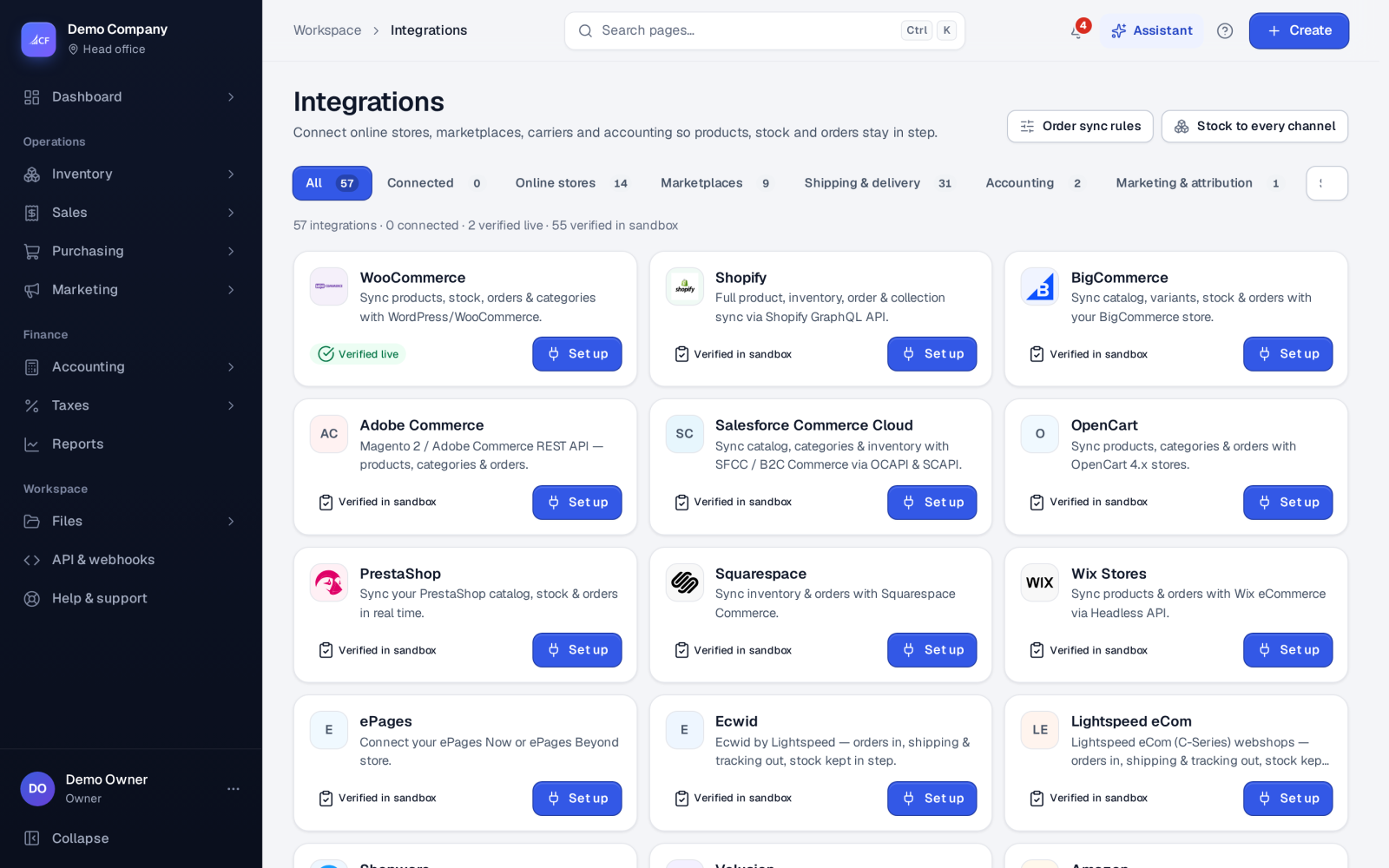
- Open Integrations and find the store or marketplace.
- Press Set up on its card and enter the details the platform gives you (or sign in on the platform's own page).
- The app checks the details with the platform before saving them.
- Bring the catalogue in once, or link your existing products by SKU.
- Check the connection's health view, then watch the first orders and stock updates.
What syncs#
- Stock out: every channel gets your available stock — on hand minus what open orders hold, whole units, never below 0. Services and non-stock products are never part of a stock push.
- Orders in: a paid order arrives approved; cash on delivery or unpaid waits; a cancel or full refund on the platform cancels it here and releases the stock. Your order rules (Integrations › Order rules) can approve waiting orders by payment or amount.
- Products: price, name, description, category, photos and "shown online" changes made here are sent to the stores that support them.
- Cancels tell the truth: the reason you choose is sent as the platform's own code. Where a platform has no code that says it truthfully, nothing is sent and you get a to-do to cancel it there. A duplicate, a data-entry error or a cancel the platform made itself is never sent back.
How far each connection is proven#
"Proven live" means it runs against the real service today. "Tested against the provider's sandbox" means it was tested against a test system of the provider's documented interface; on its card the badge reads Verified in sandbox. The first real connection is what makes it proven live.
| Kind | Connection | Proof level |
|---|---|---|
| Online store | WooCommerce | Proven live |
| Online store | Shopify, BigCommerce, Adobe Commerce, Salesforce Commerce Cloud, OpenCart, PrestaShop, Squarespace, Wix Stores, ePages, Ecwid, Lightspeed eCom, Shopware, Volusion | Tested against the provider's sandbox |
| Marketplace | Amazon, eBay, Etsy, Walmart, TikTok Shop, Meta / Facebook, Shopee, Lazada, Google Shopping | Tested against the provider's sandbox |
| Marketing | CFI Order Attribution | Tested against the provider's sandbox |
Couriers are covered in Couriers and shipping and accounting links in Accounting software sync.
How it posts to the books#
An online order is a sales order like any other: approving it holds stock, and picking, delivering and invoicing post stock, cost of goods sold, revenue and receivables as usual. Shipping on a store order is a charge to the customer (income), never a supplier bill. A payment already collected online is booked as the order's advance.
Limits and what is not there yet#
- Only WooCommerce is proven live with a real shop. For any other connection, watch the first orders, shipments and stock updates in its sync log, and report anything unexpected.
- Meta retired its order API on 27 October 2026: Facebook and Instagram shop orders now check out on your own website and arrive through your store's integration. The catalogue and stock still sync to Meta.
- Google Merchant Center takes products and stock only; Google has no orders.
Questions#
Why does the store show less stock than I have?
Stores show available stock: what you have on hand minus what open orders already hold.
Can I connect more than one store?
Yes. Several stores, and marketplaces beside them, can be connected to one business; each gets the same available stock.
Does a stock edit made on the store come back here?
No. This app is the stock master: the next push puts the store back to the figure here.
What does "Verified in sandbox" mean for me?
The connection follows the platform's documented rules but has not yet met that platform's live system. Connect it, and watch the first orders and updates closely.