
Security and data protection
How your data is kept apart and protected: an isolated database per business, private file folders, sealed credentials, rights and an audit trail.
What it is
Cash Flow Inventory is a cloud product in which each business works in its own isolated database. Its files sit in its own private folder, the credentials of its connections are encrypted, every person works with their own rights, and every change is recorded with who and when. This guide explains what is protected and what you control.
Who it is for
- Owners who must answer for the safety of their business and customer data.
- Accountants and auditors who need a trustworthy record of changes.
- Anyone connecting stores, couriers, payment providers or AI apps.
Before you start#
- The access policy is changed by the business owner only.
- Turn on two-step sign-in for yourself first (see Sign-in and two-step security).
Step by step#
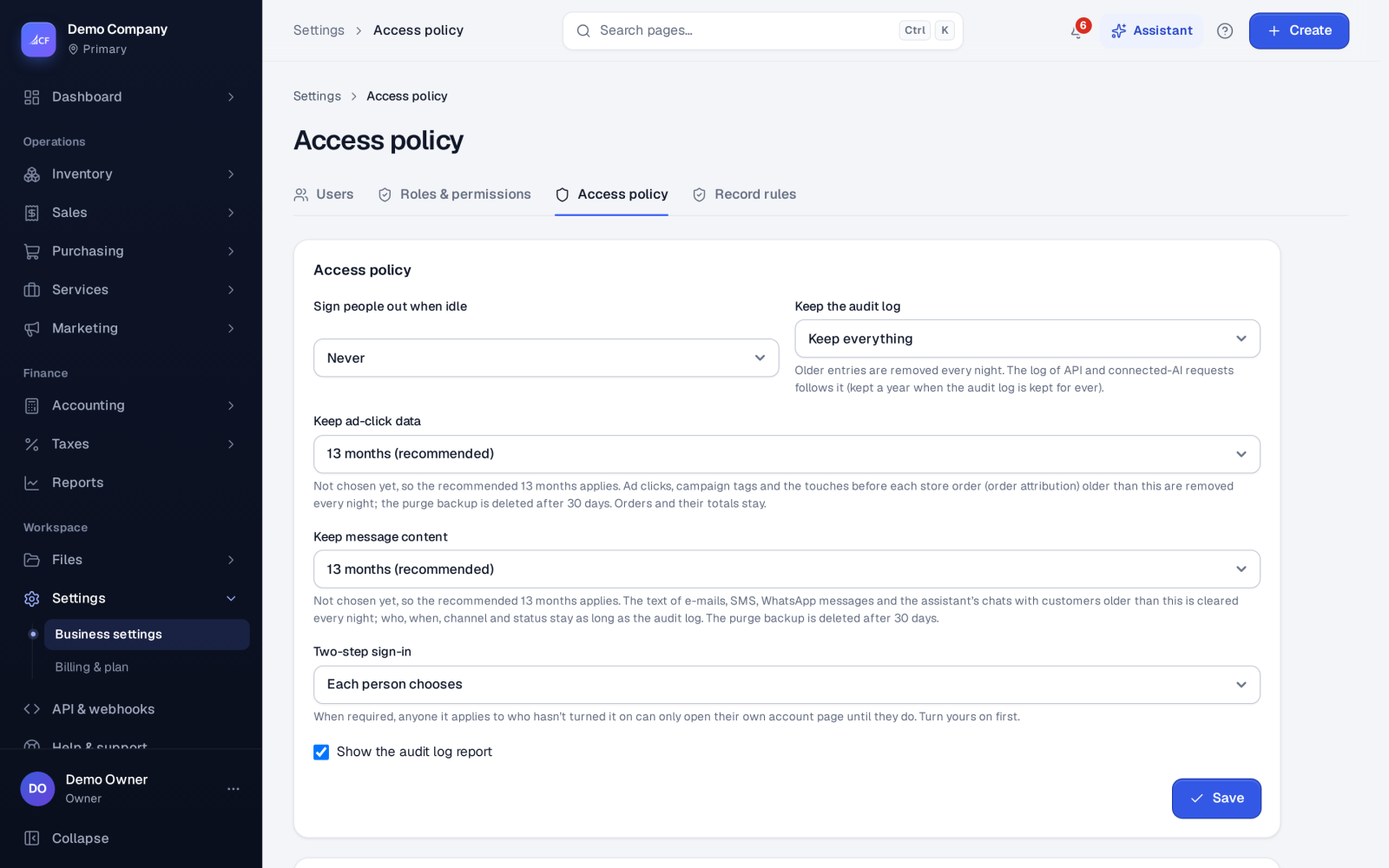
- Open Settings › Access policy.
- Set Two-step sign-in and Sign people out when idle.
- Set Keep the audit log (Keep everything, 90 days, 180 days, 1 year or 2 years) and decide whether to Show the audit log report.
- Under Who else may open settings, give each employee only the settings pages they need.
- Press Save, then review people's rights with Access review (CSV) on Settings › Users.
How your data is kept apart#
- One isolated database per business. Your records are never stored alongside another business's records.
- Your own file folder. Attachments, product photos and other files are kept in your business's own private folder, outside the public web. The folder and file names reveal nothing, and a file is served only to a signed-in person of that business who may open that kind of document — or through a signed link that expires, for what must leave the app (for example a product photo sent to your store).
- Rights everywhere. Page rights, field rights (cost, margin, supplier prices) and record rules apply in the same way to the screens, reports, exports, the API, connected AI apps and the assistant.
Credentials are sealed#
API keys, secrets, passwords, tokens and webhook secrets of every connection — couriers, online stores, marketplaces, accounting links, payment providers, messaging providers and AI connections — are encrypted before they are saved.
- They are never shown again and never put in logs, answers, exports or the assistant's context. A page shows at most that a credential is set and its last four characters.
- When you save new credentials, the app signs in with them first. If the provider refuses them, nothing is saved and you see the provider's own reason.
- New credentials replace the old ones; removing a connection deletes its credentials.
- If saved credentials are refused three times in a row, the app stops trying (so your account with the provider is not locked) and shows Sign-in failed — update the credentials. Waiting work is sent once new credentials sign in.
- Every change is in the audit log ("Credentials set / changed / removed / switched off / sign-in failed / signed in again") — never the value itself.
- The assistant never asks you to type a password or key into the chat.
Sessions#
Each sign-in is its own session. The browser holds a random token, and only a fingerprint of it is stored, so a stolen copy of the session list cannot be used to sign in. Sessions end after a period of inactivity and always after a fixed maximum, and Sign out everywhere ends them all.
Audit trail and recycle bin#
Every save, approval, cancellation, deletion and settings change is recorded with who and when. Deleted records go to the recycle bin (Files › Recycle bin), where they can be restored or purged.
Online payments and AI#
- If an online payment provider refuses the saved key three times in a row, online payment stops and customers can pay another way until a new key passes its check.
- AI apps and outside tools work with the person's own rights; text typed into records is marked as untrusted so hidden instructions are not followed. See Connect your AI app and Outside tools.
Limits and what is not there yet#
- This is a cloud product per business; on-premise hosting is not offered.
- How long personal data is kept, and how to export or erase a person's data, is in Privacy, DSAR and retention.
Questions#
Can another business ever see my data?
No. Each business has its own isolated database and its own file folder, and files are served only inside your business.
Can staff see our API keys?
No one can. A saved key is never shown again — at most that it is set and its last four characters.
Who can change the access policy?
Only the business owner.
Where do I see who changed something?
In the audit log, which records every save, approval, cancellation, deletion and settings change with who and when.