
Bills and accounts payable
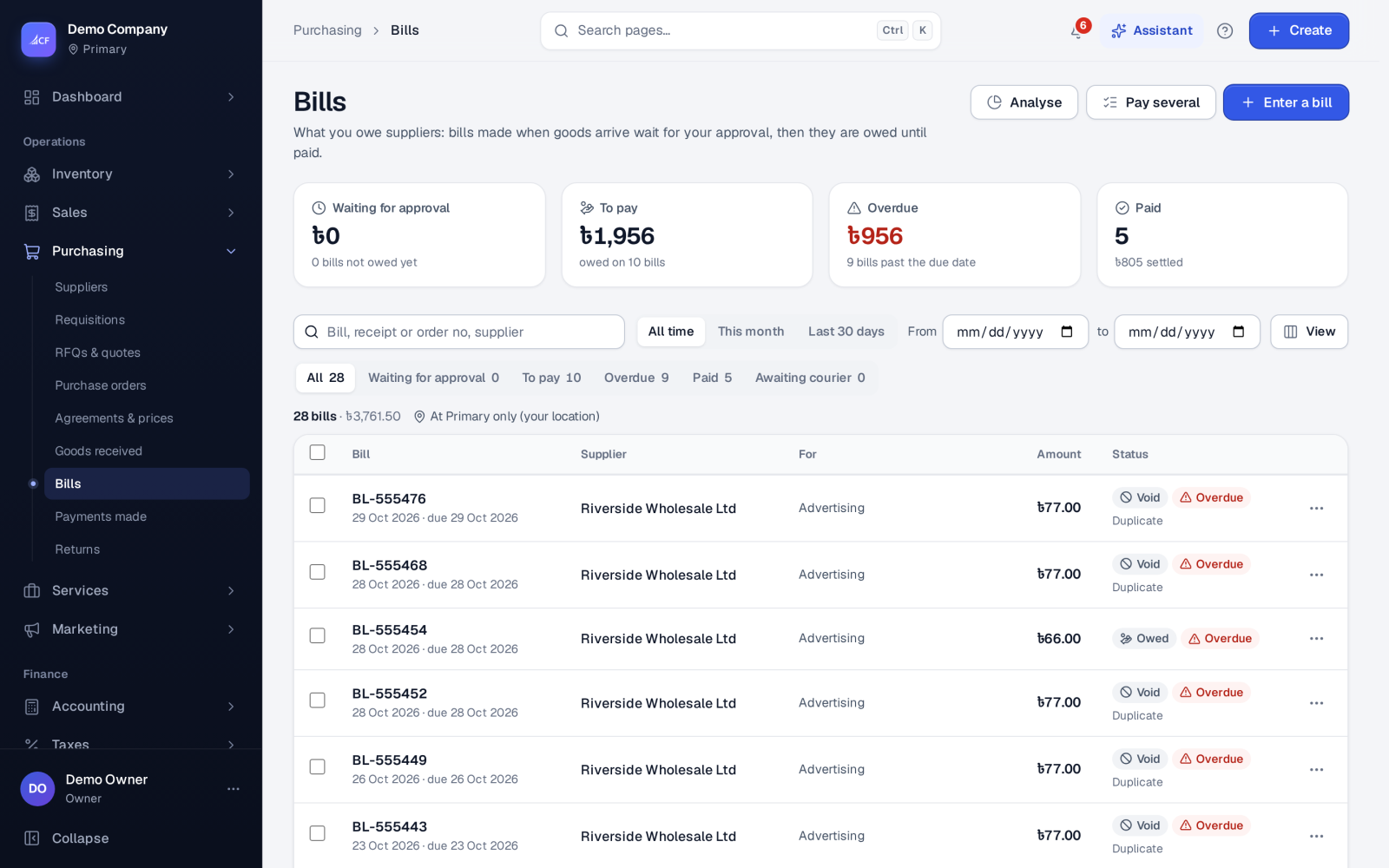
Check and approve supplier bills made from goods receipts or entered as expenses, put disputed bills on hold, correct prices and see what you owe.
What it is
A bill is what a supplier asks you to pay. Bills reach the list in two ways:
- From a goods receipt: receiving goods makes the goods bill and a bill for each extra cost, as drafts, so they match what arrived.
- Entered by hand: an expense bill — rent, fuel, services, a fixed asset — where each line goes to its own account, with its taxes added on top.
Approving a bill makes it owed: it goes onto the supplier's balance and into the payment lists. A bill closes only when it is settled — paid, returned or written off in full.
Who it is for
- Accountants and bookkeepers who process supplier bills.
- Managers who approve what the business owes.
- Buyers who resolve disputes over price or quantity.
- Owners who want to see what is due and overdue.
Before you start#
- Under Settings › Purchase › Payables control, choose how Held bills behave: Can be paid one by one after a warning, or Can't be paid until the hold is released. Bulk payment always skips a held bill.
- Set Small-balance write-off: a remainder up to this amount is written off without an approver's limit applying.
- Bill templates and Attachments can be shown under What purchase documents carry.
Step by step#
- Open Purchasing › Bills. Bills made by receipts are already there; choose Enter a bill for an expense bill.
- For an expense bill, pick the supplier, enter their bill number, the date and the payment term, which sets the due date.
- Add each line with its expense account, what it was for, quantity, amount and taxes.
- Save the bill.
- Open the bill (or the Waiting for approval view) and check it against the supplier's paper or e-invoice.
- Approve it. It now shows in To pay, and in Overdue once its due date passes.
- Pay it from its row menu with Pay, or several together with Pay several.
List views#
| View | Meaning |
|---|---|
| Waiting for approval | Not yet owed |
| To pay | Approved and still owed |
| Overdue | Owed and past the due date |
| Paid | Settled |
| Awaiting courier | A delivery bill waiting for the courier's real charge |
Holding, writing off and voiding#
- Hold payment… keeps a bill owed but out of payment while you settle a dispute with the supplier (goods not right, a duplicate suspected). Release the hold when it is resolved.
- Write off the rest… closes a remainder the supplier will not collect — rounding, a waived balance, a supplier gone. It needs the approve right and your approval limit, except within the small-balance amount.
- Void… cancels a wrong bill with a reason; the bill keeps its number and the void stays in its history.
- Correct prices… fixes the price on a bill made from a goods receipt. The difference goes to stock value for goods still on hand and to cost of goods for goods already sold.
Received e-invoices#
Where the business is connected to an e-invoicing network or portal covered by a tax pack, e-invoices your suppliers send are collected into a received e-invoices list. Nothing is posted automatically — a person turns each one into a bill, and the same invoice is never stored twice.
How it posts to the books#
- An expense bill posts when it is saved: Dr each line's account (plus tax) / Cr Accounts Payable. An edited draft is reversed and posted again.
- A bill made by a receipt was posted by the receipt; approving it posts nothing more.
- A write-off posts Dr Accounts Payable / Cr Payables written off (other income).
- A courier's delivery bill goes to the Courier Charges expense, a distribution cost, not cost of goods.
Limits and what is not there yet#
- Pay several lists bills in your base currency only, oldest due first.
- A bill made from a goods receipt opens read-only for its goods lines; correct quantities with a purchase return, prices with Correct prices….
Questions#
When does a bill count as owed?
When it is approved. Until then it shows in Waiting for approval and the supplier's balance does not include it.
Can I pay a held bill?
That depends on the Held bills setting: either one by one after a warning, or not at all until the hold is released. Paying several at once always skips held bills.
Can I edit an approved bill?
No. Correct prices with Correct prices…, return goods with a purchase return, or void the bill and enter it again.
Can bills be approved in bulk?
Yes. Tick them in the list, or use the assistant's bills work queue: approving makes each bill owed and payable, and each one is checked on its own.